 TurfAI User Guide
Integrations
Connecting TurfAI to external systems — Google, REST, OAuth2 providers, and MCP.
What it is
Integrations are how workflows and agents act on the outside world: send email, fetch from Google Drive, read/reply in Gmail, call any REST API, and connect to external tools over MCP (Model Context Protocol). Each user connects their own accounts through OAuth. TurfAI stores the tokens securely per user and refreshes them automatically at execution time.
The catalog has two layers:
- A provider registry (
integration) — one row per available provider (Google Drive, Gmail, Microsoft 365, Salesforce, Slack, …). Adding an OAuth2 provider is config, not code. - Per-user token storage (
user-integration) — each user'saccess_token,refresh_token, expiry, and connectionstatusfor a given provider.
The provider field is a free-form string, and a generic OAuth2 adapter drives the
authorize → callback → refresh flow from a JSON config. To add a new OAuth provider, you seed
one registry row and set two env vars — no schema migration, no new processor.
When to use it
Use integrations for the act half of an automation — the step after the AI has decided something. Use Email, Drive, and Gmail for Google workspaces, REST for any HTTP system, and MCP to expose TurfAI tools to external clients.
| You want to… | Use |
|---|---|
| Pull a file the workflow needs to process | Google Drive — Fetch |
| Read inbound mail and act on it | Gmail — Fetch (filter by label/from/subject) |
| Reply in-thread to a customer | Gmail — Reply |
| Notify a person with a templated message | Email — Send ({{variable}} body) |
| Call any other system (Slack, Jira, CRM, your own API) | REST API node |
| Let Claude Desktop / Cursor drive TurfAI | MCP server (read-only today) |
How it works
Whether the model uses a built-in tool, your REST endpoint, or an MCP server, the shape is the same: the model emits a structured call, your runtime runs it, and the result returns so the model can continue. Integration nodes are the "your runtime runs it" half.
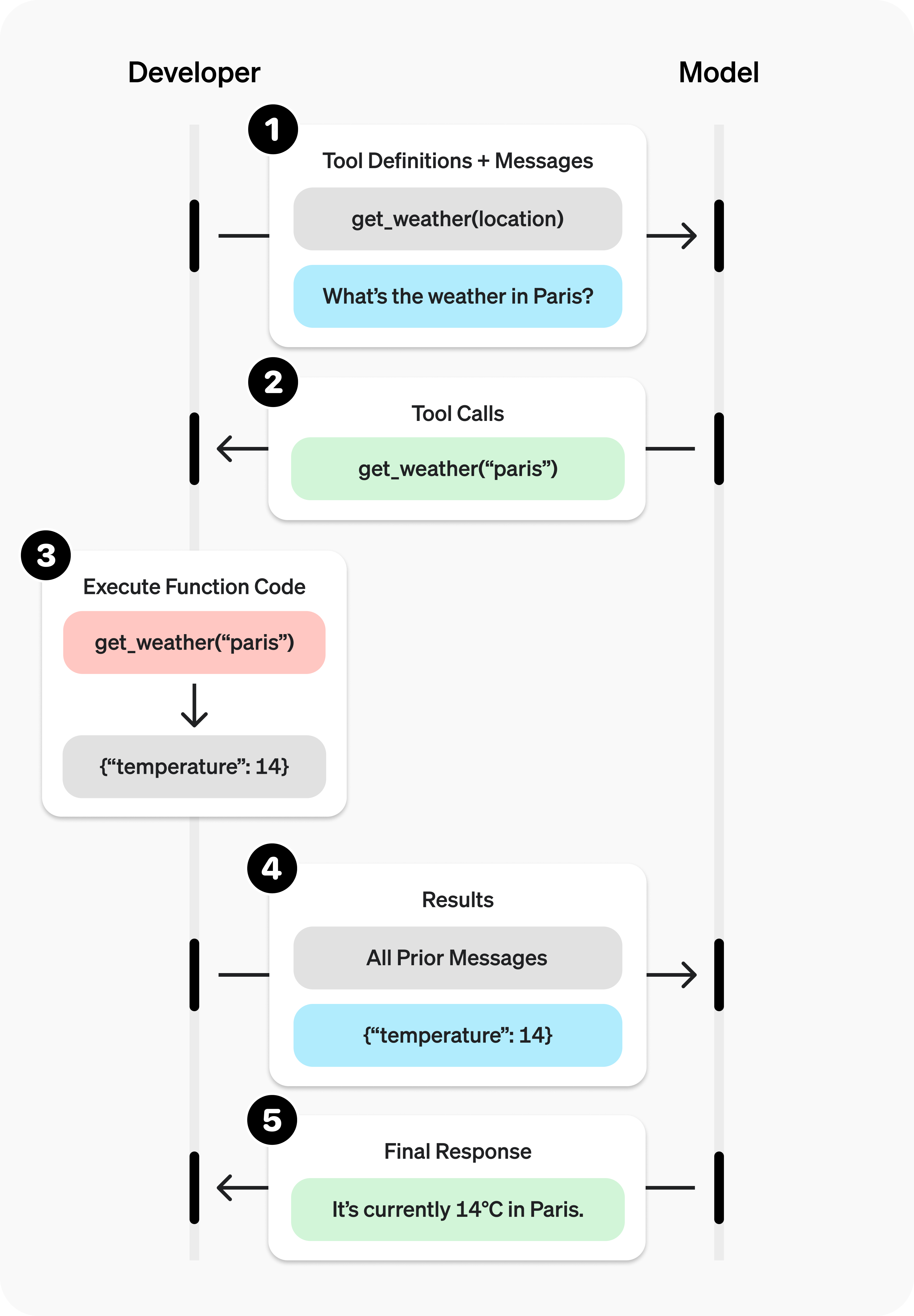
The tool-calling loop. In TurfAI the workflow executor is the runtime that runs the call.
Source: OpenAI ↗Tool-calling loop adapted from OpenAI's function-calling guide.
Process flow — connect then use:
At execution time the workflow executor runs enrichWorkflowWithOAuthTokens() right after
enrichWorkflowWithCredentials(). For any node that references a provider, the executor looks up
the user's user-integration, auto-refreshes the token if it expires within ~5 minutes,
persists the new token, and injects a plain oauth_access_token into the node's input_mapping.
The processor never sees OAuth — it just gets a token.
MCP is the open standard for these tool connections — think of it as a USB-C port for AI: connect once to a standard, reuse everywhere, instead of a bespoke integration per tool.
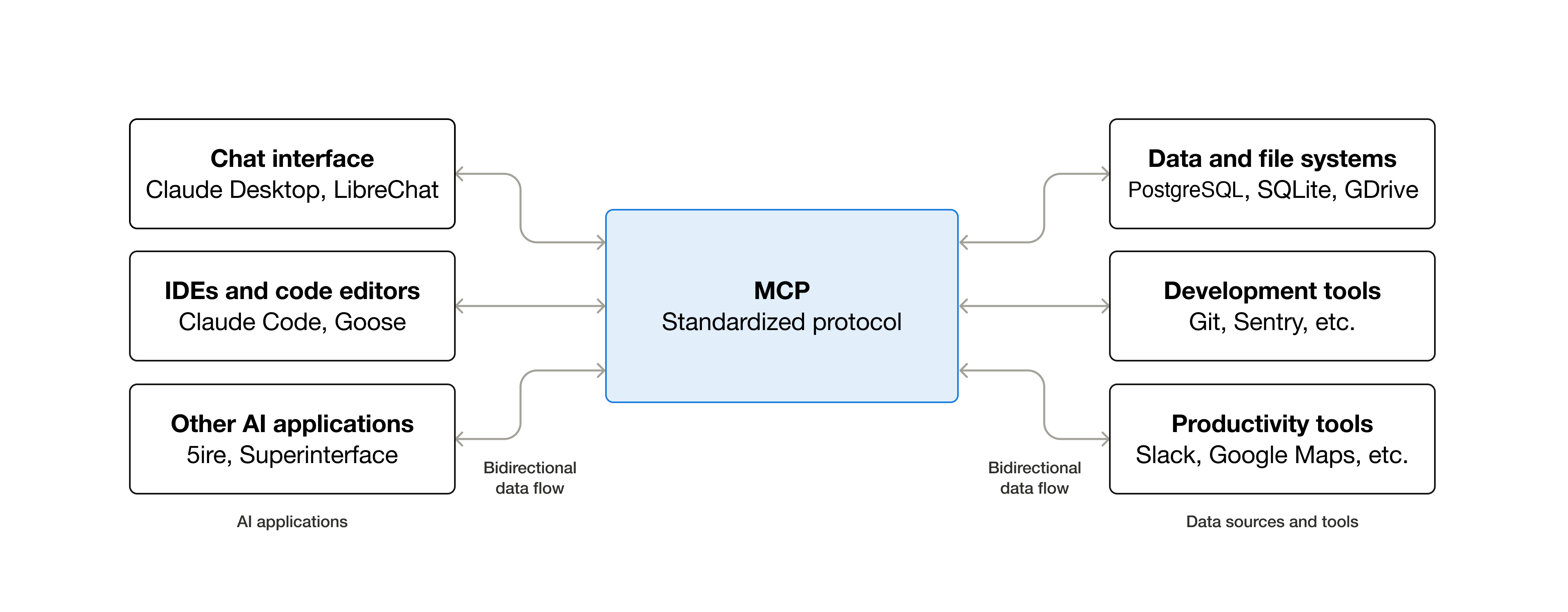
MCP standardizes how an AI app plugs into external tools, data, and workflows.
Source: Model Context Protocol (Anthropic) ↗"USB-C for AI" framing adapted from modelcontextprotocol.io.
Call flow — MCP today (read-only wrapper):
Sub-features
- Google Drive — fetch by
file_id, or search byfolder_id+file_name; imports into DMS (GCS). Dual-mode: user-delegated OAuth or a server service account. - Email (SMTP) — HTML body,
{{variable}}substitution, to/CC/BCC, customfromaddress. Best-effort (a send failure doesn't fail the whole workflow). - Gmail — fetch with filters (from, subject, label, unread, date, attachments), reply with thread preservation, download attachments.
- REST API — GET/POST/PUT/PATCH/DELETE, template vars in URL/headers/body, JSONPath
output_mapping, configurabletimeout, SSRF-guarded. - Generic OAuth2 adapter — any OAuth2 provider via
oauth_configJSON (Microsoft 365, SharePoint, Salesforce, Slack and JobAdder seeded today); PKCE supported. - SharePoint / OneDrive —
sharepoint_fetch_taskfetches files from SharePoint; OneDrive goes through the same node withsite_id: "__onedrive__". - MCP — TurfAI MCP server exposes document/workflow/RAG tools to external clients over stdio or
HTTP/SSE (read-only wrapper today). Outbound MCP — agents calling external MCP servers
(
mcp_servers) and themcp_tool_tasknode — is shipped; external servers connect over stdio today (SSE / Streamable-HTTP client transports are not yet supported). - Integration catalog — browse, connect, and manage user integrations and credentials.
Configuration parameters
Provider registry — integration (oauth_config)
These describe a provider, not a user. Reconciled with
dms/src/api/integration/content-types/integration/schema.json.
| Field | Type | Notes |
|---|---|---|
provider | string (unique) | Free-form slug, e.g. google_drive, microsoft_365. No enum — add providers without code. |
name, description, icon, category | string/text | Catalog display + grouping. |
enabled | boolean | Show in catalog (default true). |
auth_type | enum | oauth2 | api_key | hmac | custom (default oauth2). |
scopes | json | Required OAuth scopes / permissions. |
config_schema | json | Per-provider config options schema. |
auth_config | json | Generic auth keyed by auth_type (e.g. api_key_env for API-key providers). |
oauth_config | json | OAuth2 details — see below. |
oauth_config JSON (the heart of the generic adapter):
| Key | Example | Notes |
|---|---|---|
authorize_url | https://login.microsoftonline.com/common/oauth2/v2.0/authorize | Provider authorize endpoint. |
token_url | https://login.microsoftonline.com/common/oauth2/v2.0/token | Token exchange + refresh. |
userinfo_url | https://graph.microsoft.com/v1.0/me | Optional; populates metadata. |
revoke_url | null | Optional; adapter skips revoke if null. |
client_id_env | MICROSOFT_CLIENT_ID | Env var name, not the value — resolved at runtime. |
client_secret_env | MICROSOFT_CLIENT_SECRET | Same — secrets never live in the DB. |
default_scopes | ["User.Read","Mail.Read","offline_access"] | Requested at authorize. |
supports_pkce | true | Use S256 PKCE challenge. |
extra_authorize_params / extra_token_params | { "response_mode": "query" } | Provider quirks. |
Per-user token storage — user-integration
Reconciled with dms/src/api/user-integration/content-types/user-integration/schema.json.
| Field | Type | Notes |
|---|---|---|
user / integration | relation | Owner + provider. |
status | enum | connected | disconnected | error (default disconnected). |
access_token | text (private) | Injected into nodes at runtime; never returned in API responses. |
refresh_token | text (private) | Used by auto-refresh. |
token_expires_at | datetime | Drives the "refresh if expiring within ~5 min" check. |
config | json | User-scoped settings — incl. Pattern B bring-your-own client_id/client_secret. |
metadata | json | Provider info (email, username) from userinfo_url. |
last_sync | datetime | Last successful use/sync. |
webhook_id | string | Google Pub/Sub watch ID (Gmail push), etc. |
Credential resolution order: the adapter checks user-scoped
user-integration.config.client_id / client_secret first (Pattern B — enterprise tenant brings
its own OAuth app), then falls back to the platform env vars named in oauth_config
(Pattern A — one shared app, per-user tokens).
Node config (in a workflow)
| Node | Key params |
|---|---|
| REST API | url, method, headers, body, timeout (builder default 30 s; 60 s if omitted from an API-created definition), output_mapping; optional oauth_integration to inject a token |
| Email Send | to, cc, bcc, subject, body/html, from |
| Gmail Fetch | from, subject, label, is_unread, after/before (YYYY/MM/DD), has_attachment, max_results (10), download_attachments, mark_as_read |
| Drive Fetch | file_id or (folder_id + file_name) |
Tips & best practices
- REST API is the universal connector. You rarely need a dedicated processor — any HTTP API
(Slack, Jira, HubSpot, Stripe, your own service) is a REST node with the right headers and an
output_mapping. Reach for a custom processor only for streaming files, pagination, or webhook subscriptions. - Reuse credentials via
{{variable}}, never hard-code secrets. Put API keys in the credential store and reference them — e.g."Authorization": "Bearer {{slack_bot_token}}". The executor resolves them at run time and they never appear in the workflow definition. - Request least-privilege scopes. Ask only for what the workflow needs (e.g.
drive.readonly,gmail.readonly) so consent screens are easy to approve and a leaked token does less damage. - Let the platform handle token refresh. Don't store or pass access tokens yourself — set
oauth_integration: "<provider>"(or connect Google) and the executor refreshes + injects. - For OAuth setup, store env var names in
oauth_config, then set the actualPROVIDER_CLIENT_ID/PROVIDER_CLIENT_SECRETin the environment. Restart DMS and the provider appears in the catalog with a working Connect button. - Map outputs narrowly. Pull just the fields you need with JSONPath
output_mappingso downstream nodes get clean, named values instead of a giant response blob.
Concrete examples
1 — Connect a Google integration (OAuth).
- Open the Integrations catalog.
- Click Connect on Google Drive or Gmail. The popup requests the default scopes
(
drive.readonly,gmail.readonly,gmail.modify,gmail.send,userinfo.email,userinfo.profile) withaccess_type=offlineandprompt=consent, so Google issues a refresh token. - Approve the consent screen. On callback, TurfAI saves the tokens to your
user-integrationandstatuschanges toconnected.
2 — REST API node with custom headers + JSONPath output mapping.
{
  "task_type": "rest_api_task",
  "config": {
    "url": "https://api.example.com/v1/orders/{{order_id}}",
    "method": "GET",
    "headers": {
      "Authorization": "Bearer {{example_api_key}}",
      "Content-Type": "application/json"
    },
    "timeout": 30,
    "output_mapping": {
      "order_status": "$.data.status",
      "total": "$.data.amount.total"
    }
  }
}
{{order_id}} and {{example_api_key}} resolve from inputs / the credential store; the executor
applies the JSONPath output_mapping so downstream nodes see order_status and total.
3 — Gmail fetch with a label filter.
{
  "task_type": "gmail_fetch_task",
  "config": {
    "label": "Invoices",
    "is_unread": true,
    "has_attachment": true,
    "max_results": 10,
    "download_attachments": true
  }
}
Returns { emails: [...], attachments: [...], count }; attachments are imported to GCS for
downstream processing.
4 — Email send with a templated body.
{
  "task_type": "email_send_task",
  "config": {
    "to": "{{customer_email}}",
    "cc": "[email protected]",
    "subject": "Your order {{order_id}} shipped",
    "html": "<p>Hi {{customer_name}},</p><p>Order <b>{{order_id}}</b> is on its way.</p>",
    "from": "[email protected]"
  }
}{{customer_email}}, {{order_id}}, {{customer_name}} come from the workflow context.
5 — Outbound to a non-Google OAuth provider (e.g. Microsoft 365 once connected): set
oauth_integration and the executor injects oauth_access_token for you.
{
  "task_type": "rest_api_task",
  "config": {
    "oauth_integration": "microsoft_365",
    "url": "https://graph.microsoft.com/v1.0/me/messages",
    "method": "GET"
  }
}
MCP read-only wrapper note. The TurfAI MCP server exposes document/workflow/RAG tools to
clients like Claude Desktop and Cursor over stdio or HTTP/SSE. Today it is a read-only wrapper: it creates
DMS jobs and polls results, and it cannot change platform config. Outbound MCP (agents calling
external MCP servers via mcp_servers, or the mcp_tool_task node) is available; external servers
connect over stdio — SSE / Streamable-HTTP client transports are not yet supported.
Dependencies
- Google OAuth 2.0 (legacy Google-specific flow) for Drive/Gmail; generic OAuth2 adapter
for everything else; per-user token storage in
user-integration. - DMS as the single API gateway — frontend, processors, and the MCP server talk only to DMS, never directly to provider SDKs or Python services. DMS owns OAuth token handling.
- Processors execute integration tasks; job router / Redis dispatch them.
Limitations
- Drive/Gmail require the user to have connected Google OAuth with the right scopes (and to have granted offline access so a refresh token exists).
- The MCP server is read-only today; outbound MCP to external servers works over stdio only (SSE / Streamable-HTTP client transports are not yet supported).
- REST calls honour SSRF protections — blocked schemes (
file,ftp,gopher,data,javascript), blocked metadata hosts (169.254.169.254,metadata.google.internal), and private/reserved IP ranges. Self-calls back to DMS are explicitly allowed. - Tier 1–3 providers beyond the seeded ones are coming soon (see Roadmap).
Troubleshooting
| Symptom | Likely cause | Fix |
|---|---|---|
| OAuth token refresh fails; node errors with auth | No refresh_token stored (user didn't grant offline access), or the user revoked the app | Reconnect the provider; the Google flow requests access_type=offline + prompt=consent to force a fresh refresh token. Persistent failures retry with backoff, then flag status=error. |
| REST node times out or returns non-2xx | Endpoint slow/down (5xx, 429 → transient) or bad auth/URL (4xx → terminal) | Raise timeout; verify URL + {{credential}} resolve; check the endpoint isn't blocked by SSRF rules. Transient codes are retried; config errors fail fast. |
| Gmail filter returns nothing | Label name mismatch (case-sensitive), or filters too narrow (is_unread/date/has_attachment) | Confirm the exact Gmail label, loosen filters, widen after/before (YYYY/MM/DD), raise max_results. |
{{credential}} not resolving (literal {{…}} sent) | Name doesn't match a stored credential / context key, or the credential isn't shared with the user | Check the credential store name exactly; confirm it's in scope; remember resolution runs in the executor, not the processor. |
| Provider shows "Coming Soon" / can't connect | No oauth_config seeded, or CLIENT_ID/CLIENT_SECRET env vars unset | Seed the registry row with oauth_config, set the two env vars named in it, restart DMS. |
How to test
- Connect Google → run a Drive fetch. Connect Google OAuth from the catalog; confirm
status: connected. Add a Drive Fetch node with a realfile_id, run the workflow, and confirm the output hasfile_url/file_name/mime_type. - Store a REST credential → call your API → map output. Save an API key in the credential
store, add a REST node using
"Authorization": "Bearer {{your_api_key}}", set anoutput_mapping(e.g.{"status": "$.data.status"}), run it, and confirm the mapped field appears in the next node's inputs. - Email send. Run an Email Send node with
{{variable}}substitution and confirm delivery in the run timeline. - Gmail filter. Run a Gmail Fetch with a known
labeland confirmcount> 0. - (MCP) Point an MCP client at the TurfAI MCP server and call a document/workflow tool.
Cross-links
- Event Bus / Triggers — what starts a workflow (the inbound half to
integrations' outbound half), incl. Gmail push via
webhook_id. - Visual Workflow Builder — where you drop integration
nodes, wire
input_mapping, and setoutput_mapping.
Roadmap
The generic OAuth2 adapter (Tier B) is complete, with Microsoft 365, SharePoint, Salesforce,
Slack and JobAdder seeded (SharePoint/OneDrive files via sharepoint_fetch_task). Remaining
providers ship via the generic OAuth2 adapter or zero-code REST templates — coming soon:
| Tier | Examples | How they'll land |
|---|---|---|
| Tier 1 | HubSpot, Teams | Generic OAuth2 adapter + (for files) dedicated processors |
| Tier 2 | Jira, Asana, Monday, BambooHR, Workday, Google/Outlook Calendar, Typeform | OAuth2 adapter or REST templates |
| Tier 3 | Stripe, Razorpay, Twilio, DocuSign, databases, external LLM APIs | Mostly zero-code REST templates (API key) |
Outbound MCP — agents calling external MCP servers as tools — is shipped over stdio; SSE / Streamable-HTTP client transports are not yet supported (the TurfAI MCP server itself is inbound/read-only today).
APIs used
| Method | Path | Purpose |
|---|---|---|
GET | /api/oauth/:provider/authorize | Build authorize URL (generic adapter, any provider) |
GET | /api/oauth/:provider/callback | Exchange code, store tokens |
POST | /api/oauth/:provider/revoke | Revoke + set status=disconnected |
GET | /api/oauth/:provider/status | Per-user connection status |
GET | /api/integrations | Provider catalog |
GET | user-integration endpoints | Manage connected accounts |
| (node) | Email Send / Drive Fetch / Gmail / REST API | Act on external systems in a workflow |
| MCP (stdio, HTTP/SSE) | document / workflow / RAG tools | External clients drive TurfAI (read-only) |
See architecture/integrations.md and architecture/mcp/architecture.md in the source repo.